Switches get replaced every five to eight years. Access points even sooner. The cabling behind them often stays in the walls for fifteen to twenty-five years, which makes it the longest-lived and least forgiving part of your network. Poorly installed or undocumented cabling causes intermittent errors that waste hours of troubleshooting, limits the speeds you can upgrade to, and turns every move or change into guesswork. This guide covers the structured cabling and fiber knowledge every network admin should have: TIA-568 essentials, copper categories, multimode and single-mode fiber, connectors, patch panel labeling and how cabling is tested.
Why the physical layer deserves your attention
Most network admins learn a lot about protocols and very little about cabling, until a link starts throwing CRC errors or a new access point refuses to negotiate above 1 Gbps. Layer 1 problems are some of the hardest to diagnose because the symptoms are indirect: slow file transfers, VoIP call quality issues, Wi-Fi complaints or links that flap only when the air conditioning cycles. That is why a good troubleshooting methodology starts at the physical layer.
Understanding cabling also makes you a better buyer. You do not need to terminate cables yourself, but you do need to specify the right category, review a cabling contractor’s proposal, check test reports and recognize a sloppy installation before you sign off on it. Those decisions shape what your network can do for the next two decades.
Structured cabling and the TIA-568 family
Structured cabling means a standardized, hierarchical cabling system that is independent of the equipment plugged into it. Instead of running cables directly from a switch to a desk, you install permanent cabling between patch panels and outlets, then make connections with short patch cords. Moves and changes become patching jobs rather than construction projects.
The standards that matter
- ANSI/TIA-568 is the core series: TIA-568.0 covers generic customer-premises cabling, TIA-568.1 commercial buildings, TIA-568.2 balanced twisted-pair cabling and components, and TIA-568.3 optical fiber cabling and components.
- ANSI/TIA-569 covers pathways and spaces: conduits, trays and telecommunications room design.
- ANSI/TIA-606 covers administration, meaning labeling and records.
- ANSI/TIA-607 covers bonding and grounding.
- ANSI/TIA-942 addresses data center infrastructure.
The building blocks of a structured system
- Entrance facility: where service provider and campus cables enter the building.
- Equipment room: the main room for core switches, servers and the building’s main cross-connect.
- Telecommunications room (TR): the wiring closet on each floor or zone that serves the horizontal cabling, often called an IDF.
- Backbone cabling: links between the equipment room and TRs, and between buildings, usually fiber.
- Horizontal cabling: runs from a TR patch panel to work-area outlets, ceiling-mounted access points and other endpoints, usually twisted-pair copper in a star topology.
- Work area: the outlet and the patch cord to the device.
The 90 plus 10 rule
A twisted-pair channel is limited to 100 meters. That budget is split into a permanent link of up to 90 meters of solid-conductor horizontal cable, from the patch panel to the outlet, plus up to 10 meters total of patch cords at both ends. Stranded patch cords have higher attenuation than solid cable, which is why the split exists. Plan TR locations so that no outlet is more than 90 meters of cable path away, remembering that cable routes up, across and down rather than in a straight line.
Copper categories: Cat5e, Cat6, Cat6A and beyond
Twisted-pair cable categories define performance up to a specified frequency, which in turn determines which Ethernet speeds a link supports over which distances.
| Category | Specified bandwidth | Ethernet support | Typical use today |
|---|---|---|---|
| Cat5e | 100 MHz | 1000BASE-T and 2.5GBASE-T to 100 m; 5GBASE-T may work but is not guaranteed | Existing installations; not recommended for new builds |
| Cat6 | 250 MHz | Up to 5GBASE-T to 100 m; 10GBASE-T to about 55 m depending on alien crosstalk | Desktop connections where 1 Gbps is enough |
| Cat6A | 500 MHz | 10GBASE-T to 100 m | New installations, access points, high-power PoE |
| Cat8 | 2000 MHz | 25GBASE-T and 40GBASE-T to 30 m | Short data center links between adjacent racks |
Category 7 and 7A are ISO/IEC classes (F and FA) and are not recognized by TIA; you will rarely see them specified in North America. For new horizontal cabling, Cat6A is the sensible default. Wi-Fi 6, 6E and 7 access points increasingly use multigigabit uplinks at 2.5, 5 or 10 Gbps, and industry guidance for access point cabling recommends Cat6A. If you are planning wireless, see our enterprise Wi-Fi design guide for how cabling fits into AP placement.
Practical details that affect performance
- Solid versus stranded: use solid-conductor cable for permanent links and stranded cable only for patch cords.
- Unshielded versus shielded: U/UTP is standard and easy to install. Shielded cable such as F/UTP or S/FTP improves noise immunity and alien crosstalk performance but must be properly bonded end to end, or the shield can make matters worse.
- Avoid copper-clad aluminum (CCA): it does not meet TIA-568 requirements, has higher resistance, runs hotter with PoE and breaks more easily.
- Jacket ratings: building and fire codes dictate where each rating may be used. In North America, CMP (plenum) is required in air-handling spaces, CMR (riser) for vertical runs between floors, and CM for general use. Many regions specify low-smoke zero-halogen (LSZH) jackets instead.
- Installation workmanship: keep pair untwisting at terminations to no more than 13 mm (0.5 inch), respect a minimum bend radius of four times the cable diameter for four-pair horizontal cable, and do not exceed 110 N (25 lbf) of pulling tension. Over-tightened cable ties that deform the jacket degrade performance too; hook-and-loop straps are kinder.
T568A and T568B wiring
TIA-568 defines two pin assignments for eight-position modular jacks. Both perform identically; what matters is using the same one at both ends of every permanent link and across the whole installation. Many projects specify T568A, while T568B is very common in commercial installations in North America.
| Pin | T568A | T568B |
|---|---|---|
| 1 | White/green | White/orange |
| 2 | Green | Orange |
| 3 | White/orange | White/green |
| 4 | Blue | Blue |
| 5 | White/blue | White/blue |
| 6 | Orange | Green |
| 7 | White/brown | White/brown |
| 8 | Brown | Brown |
A cable wired T568A on one end and T568B on the other is a crossover cable. With Auto-MDI/MDI-X supported on practically all modern switch ports, and required for 1000BASE-T and faster to use all four pairs regardless, crossover cables are largely obsolete. Mixing standards in permanent cabling, however, still causes confusion and failed tests, so specify one and enforce it.
Power over Ethernet and cable choice
Power over Ethernet turns your data cabling into a power distribution system for phones, access points, cameras, lighting and building sensors. Higher power means more current, and more current means more heat in the cable bundle.
| Standard | Type | Power at switch port (PSE) | Power available at device (PD) | Pairs used |
|---|---|---|---|---|
| IEEE 802.3af (PoE) | Type 1 | 15.4 W | 12.95 W | 2 |
| IEEE 802.3at (PoE+) | Type 2 | 30 W | 25.5 W | 2 |
| IEEE 802.3bt | Type 3 | 60 W | 51 W | 4 |
| IEEE 802.3bt | Type 4 | 90 W | 71.3 W | 4 |
The difference between PSE and PD power is lost as heat in the cable over a full-length channel. In large bundles that heat accumulates, raising conductor temperature and insertion loss. TIA TSB-184-A provides guidance on bundle sizes and cable choice for power delivery; in practice, Cat6A with its larger conductors handles heat better, and smaller bundles in open pathways help. If you plan to deploy high-power PoE devices, tell your cabling designer up front.
Fiber basics: multimode and single-mode
Fiber carries light instead of electrical signals, which means no electromagnetic interference, no ground loops between buildings and far greater distances. Every fiber has a core that carries light and a cladding, typically 125 microns in diameter, that keeps it there. The core size defines the fiber type.
- Multimode fiber (MMF) has a 50 or 62.5 micron core. Light travels in many paths (modes), which limits distance, but inexpensive 850 nm VCSEL optics make it the cost-effective choice inside buildings and data centers.
- Single-mode fiber (SMF) has a core of about 9 microns. Light travels essentially in one mode, allowing distances of kilometers using 1310 nm and 1550 nm lasers. Single-mode optics used to be much more expensive, but the gap has narrowed considerably, and SMF is increasingly chosen for backbones to future-proof them.
| Type | Core/cladding | Typical jacket color | 10GBASE-SR reach | 40GBASE-SR4 / 100GBASE-SR4 reach | Notes |
|---|---|---|---|---|---|
| OM1 | 62.5/125 µm | Orange | 33 m | Not supported | Legacy; avoid for new work |
| OM2 | 50/125 µm | Orange | 82 m | Not supported | Legacy |
| OM3 | 50/125 µm laser-optimized | Aqua | 300 m | 100 m / 70 m | Common in existing buildings |
| OM4 | 50/125 µm laser-optimized | Aqua or violet | 400 m | 150 m / 100 m | Preferred multimode for new work |
| OM5 | 50/125 µm wideband | Lime green | 400 m | 150 m / 100 m | Adds short-wavelength WDM (about 850 to 950 nm) |
| OS2 | 9/125 µm single-mode | Yellow | Not applicable (uses LR optics: 10 km) | Uses LR4 optics: 10 km | Backbones, campus and long runs |
Fiber connectors, polish and polarity
Common connector types
- LC: a small form-factor connector with a 1.25 mm ferrule and latch, usually in duplex pairs. It is the standard interface on SFP, SFP+, SFP28 and most duplex QSFP optics, and the dominant connector in modern patch panels.
- SC: a larger push-pull connector with a 2.5 mm ferrule. It is common in older enterprise installations and widely used in service provider and fiber-to-the-premises networks.
- ST: a legacy bayonet-style connector found in older multimode installations.
- MPO/MTP: multi-fiber connectors with 8, 12, 16 or 24 fibers in one ferrule, used for high-density trunks and parallel optics such as 40GBASE-SR4 and 100GBASE-SR4, which use eight fibers. MTP is a branded variant of MPO.
UPC versus APC
Connectors also differ in end-face polish. UPC (ultra physical contact) connectors have a slightly domed, flat end face; single-mode UPC connectors are usually blue. APC (angled physical contact) connectors are polished at an 8-degree angle to reduce back reflection and are green. APC is common in passive optical networks and RF-over-fiber; most enterprise Ethernet optics use UPC. Never mate APC with UPC.
Polarity
Duplex fiber links need the transmitter at one end connected to the receiver at the other. TIA-568 defines polarity methods so that this works consistently through patch panels and trunks; for duplex links the principle is A-to-B, meaning position A at one end connects to position B at the other. For MPO trunk systems, the chosen method (A, B or C) determines which trunk, cassette and patch cord types you need, so stay consistent across the installation. When a new fiber link shows no light at all, reversed polarity is one of the first things to check.
Patch panels, labeling and cable management
A cabling system that cannot be identified cannot be managed. TIA-606 defines an administration standard with classes that scale from a single telecommunications room to multi-building campuses, and a consistent identifier scheme for spaces, racks, panels, ports and cables.
A practical labeling scheme
Whatever format you adopt, an identifier should tell you where the other end is. A simple scheme in the spirit of TIA-606 encodes floor, room, rack, panel and port:
| Label | Meaning |
|---|---|
| 2B-R03-PA-24 | Floor 2, telecom room B, rack 03, patch panel A, port 24 |
| Outlet faceplate: 2B-R03-PA-24 | The same identifier at the work area, so the two ends always match |
| 1A-R01-FA-05/06 | Floor 1, equipment room A, rack 01, fiber panel A, ports 5 and 6 (a duplex pair) |
- Label both ends of every permanent link and every backbone cable, plus the panel and the faceplate.
- Use printed, durable labels; handwriting fades and smudges.
- Record every link in your documentation with its test result, and keep the identifiers identical to the physical labels. Our network documentation guide covers how to keep those records current.
- Match switch interface descriptions to the patch panel port, for example
description 2B-R03-PA-24 Room 214 desk 3, soshow interfaces descriptiontells you where a port goes.
Rack and patching discipline
Use horizontal cable managers between panels and switches, choose patch cord lengths that fit rather than coiling excess, and adopt a simple color convention, for example one color for access ports, another for uplinks and another for management. Keep power and data separated where possible. A tidy rack is not about appearance; it is about being able to trace and replace a cable in minutes without disturbing neighboring connections.
Testing, certification and troubleshooting
Copper testing levels
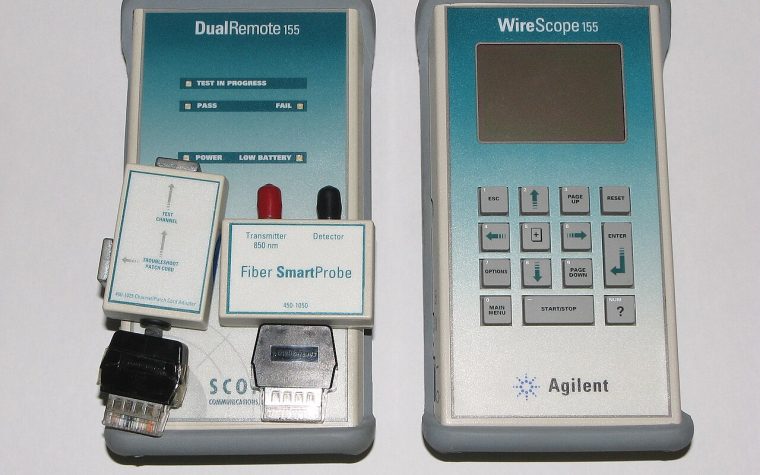
- Verifiers check continuity and wire map: opens, shorts, reversed and split pairs. Useful, but they say nothing about performance.
- Qualifiers determine whether a link can support a particular Ethernet speed, which is handy for troubleshooting existing cabling.
- Certifiers measure the link against TIA or ISO category limits: wire map, length, insertion loss, near-end crosstalk (NEXT) and power sum NEXT, far-end crosstalk (ACR-F), return loss, propagation delay and delay skew, and resistance unbalance relevant to PoE. Certification reports are normally required for manufacturer warranties.
New links are usually tested as a permanent link, panel to outlet, excluding patch cords. Insist on a certification report for every link in a new installation, check that each result says PASS rather than a marginal result, and store the reports with your documentation.
Fiber testing
Tier 1 testing uses an optical loss test set, a calibrated light source and power meter, to measure insertion loss, length and polarity. Tier 2 testing adds an OTDR trace that shows the location and loss of each connector, splice and fault along the link. Before any testing or connection, inspect and clean every end face: contamination is the leading cause of fiber link problems, and a single dust particle on a single-mode core can cause significant loss.
Calculating a loss budget
Compare measured loss with a calculated maximum using TIA-568.3 allowances: 3.5 dB per kilometer for multimode at 850 nm, 1.0 dB per kilometer for inside-plant single-mode (0.5 dB per kilometer outside plant), 0.75 dB per mated connector pair and 0.3 dB per splice. For a 120-meter OM4 link with a connector pair at each patch panel and no splices:
Fiber: 0.12 km × 3.5 dB/km = 0.42 dB. Connectors: 2 × 0.75 dB = 1.50 dB. Maximum allowable loss: 1.92 dB.
A well-installed link will measure well under that maximum. Also confirm the total is within the loss budget of the optics you plan to use, which the transceiver data sheet or the relevant IEEE standard specifies.
Checking cabling from the switch
Your switches can tell you a lot about the physical layer. Rising CRC and input errors usually point to cabling, connectors or duplex issues; optical power readings reveal dirty or failing fiber links; and many Catalyst switches include a time-domain reflectometer test for copper:
show interfaces GigabitEthernet1/0/24
show interfaces GigabitEthernet1/0/24 counters errors
show interfaces transceiver detail
test cable-diagnostics tdr interface GigabitEthernet1/0/24
show cable-diagnostics tdr interface GigabitEthernet1/0/24
Watch interface error counters over time rather than as a one-off snapshot; a monitoring platform that trends errors per interface, as described in network monitoring 101, catches a degrading cable long before users notice.
Key takeaways
- Cabling outlives every active device, so specify it carefully: Cat6A for new horizontal copper, OM4 or OS2 for backbones.
- Respect the 100-meter channel: up to 90 meters of permanent link plus up to 10 meters of patch cords.
- Pick T568A or T568B and use it consistently; avoid CCA cable and use the correct jacket rating for each space.
- Plan for PoE heat with appropriate cable and bundle sizes, especially for 802.3bt devices.
- Match fiber types and polish: never mix multimode core sizes, multimode with single-mode, or APC with UPC.
- Label both ends of every link, keep records that match the labels, and demand certification reports for every new installation.
- Inspect and clean fiber before every connection, and trend interface errors to catch physical problems early.
Planning an office move, a new build or a cabling refresh? Our Small Business Network Setup service covers cabling requirements, contractor coordination and acceptance testing alongside the network itself. If you would like a second opinion on a cabling proposal, contact us.